User Profile

motobojo
Junior
Joined 9 years ago


User Widgets
Contributions
TV White Space technologies
Let me state right out of the gate that I am multi-decade customer of hughesnet. I am very satisfied with Gen5 relative to the history of satellite based ISP (Internet Service Provider) services. That being said, as is repeatedly pointed out in these forums satellite ISPs have limits. To date, economic considerations have limited the options for those of us who live in sparsely populated, rural & remote areas when it comes to ISPs. Simply put, there has been little or no potential Return On Investment (ROI) for companies to put in place infrastructure in sparsely populated areas. I've recently been hearing of certain initiatives to help provide higher quality ISP options for certain sparsely populated areas. A notable general effort can be found in the Microsoft Airband Initiative. One key technology to enable that is TV White Space (TVWS) (the link provided here is just one example of a player in this technology space). This article ("Town's experiment could help bring internet to millions") provides one pedestrian perspective on the topic. I've become particularly interested in the technology and business aspects of this because a local ISP is offering service based on this technology. From an ISP customer perspective I have the following assessment: Pros: + No data limits including no data monitoring and attendant throttling. + Download speeds at least as fast as hughesnet Gen5 (maybe even better) + Upload speeds on par with download speeds, so definitely better upload speeds + Immensely less latency (terrestrial turn-around, cf., satellite distances) + Comparable monthly cost. + No contract lock-in period. + Relatively low cost initial equipment costs. Cons: - Will the company be around for the long haul? - Unknown reliability of service. - Unknown consistency of speeds as a function of load. - No equipment rental option (just purchase, though cost is not that great). I'm posting this mostly to get feedback from folks on what they might know of the technology and the businesses that might result. What trade-offs might I be missing? I don't think this is a significant threat to providers like hughesnet. The technology still requires local base stations with limited range to connect to high-bandwidth Internet connections. There will still be economic considerations relative the number potential customers that can be reached that will limit the availability of these services. I look forward to your thoughts and insightsRe: Trouble with new security protocols
Thanks Amanda. The workaround of disabling IPV6 for my internet connection around my visit to this site did the trick. I hope whoever needs to gets the problem fixed as that is a clumsy thing to need to do just to get my business done on a site. Sorry I missed the existing solution in the archive.5.2KViews0likes0CommentsTrouble with new security protocols
I'm having trouble getting to a web site I haven't had trouble with in the past: treasurydirect.gov I've tried 4 different browsers: Firefox, Edge, Chrome, IE. All fail. An error page stating the following comes up (from Firefox): Secure Connection Failed The connection to the server was reset while the page was loading. The page you are trying to view cannot be shown because the authenticity of the received data could not be verified. Please contact the website owners to inform them of this problem. I have contacted TreasuryDirect by phone. They indicated that I am not alone in experiencing this difficulty. They indicated a recent update to their security protocols and are considering whether that change might be the problem. They did indicate that they thought the problem was isolated to a small set of Win10 systems. I'm on Win10. The OS is up-to-date as are all of the browers being used. It behaves the same on both my tablet and my desktop computer (both on up-to-date Win10 systems). I'm on Gen5. I called a friend who tried to access the site on a Win7 system with the Chrome browser and had the same problem. That friend is also on Hughesnet (Gen 5). This makes me wonder if it isn't a problem with this secure site's interaction with Hughesnet. While I'd hope it wouldn't make any difference I've currently used up my allowance. I don't think that was the case for my friend. fwiw: I've been able to access other sites with secure-predilictions : e.g. e-commerce sites & a set of other goverment sites. Can any of you successfully get to this site? Thanks for any insight you can provide.Solved5.5KViews0likes5CommentsRe: How to turn off automatic updates on Windows 10
I am a user of the metered connection hack to control the timing of my update downloads. Please be aware that Microsoft Office updates won't happen when you have metered connection set. Office detects that updates are available and reminds you of that fact. However, when you go through the series of prompts to actually get the update to download the download will silently fail. This is despite the fact that it detects you have 'metered connection' set and verifies that you would like to override it for the purpose of the download. I found that in order to get the update I needed to temporarily disable the metered connection setting. I spent quite a number of cycles trying to figure out why the Office update would not complete.7.9KViews0likes1CommentRe: How do I set my connection to metered? Windows 10.
I am a user of the metered connection hack to control the timing of my update downloads. Please be aware that Microsoft Office updates won't happen when you have metered connection set. Office detects that updates are available and reminds you of that fact. However, when you go through the series of prompts to actually get the update to download the download will silently fail. This is despite the fact that it detects you have 'metered connection' set and verifies that you would like to override it for the purpose of the download. I found that in order to get the update I needed to temporarily disable the metered connection setting. I spent quite a number of cycles trying to figure out why the Office update would not complete.12KViews0likes0CommentsRe: Hughesnet Usage Meter 6.6.0 is blank on Gen5
cherylclarkwa wrote: I am using usage meter 6.6.1.0 with Gen 5, Windows 10 , and get the zoomed in message. Ialso get this message with blank window with wvery usage meterfor thepast year. I would like to try zooming out The + and - keys do nothing. How do I zoom out?? As Liz wrote in an earlier post in this string: Please navigate to your Windows 10 display settings: Start > Settings > System > Display You'll see in this display setting window this option with a slider underneath: Change the size of text, apps, and other items8.6KViews1like0CommentsRe: Hughesnet Usage Meter 6.6.0 is blank on Gen5
Liz wrote: Thank you for your continued feedback! I just got word that our Usage Meter devs are currently working on having the Usage Meter work at higher magnification settings. Once I have any other updates on this, I will post back. That's great news. I hope I'm not being too needy, but it would be really nice if they could fix the color scheme stuff (as mentioned elsewhere -- honor OS's UI color scheme or allow selection of alternative, broad range of color schemes).3.9KViews0likes1CommentRe: Hughesnet Usage Meter 6.6.0 is blank on Gen5
C0RR0SIVE wrote: What resolution are you at...? Certain resolutions aren't supported as the program requires a certain amount of screen space, if it can't display, it will throw that "error". The lower the resolution, the more likely you are to encounter that. Resolutions and Scaling @A: 1920*1080 @ 175% = Zoomed In Message @A: 1920*1080 @ 150% = Works @1920*1080 @ 175% is what works best for my eyesight on my Microsoft Surface Pro. Going to 150% increases eye strain for me. So what I hear you saying is that I'm SOL relative to using the HughesNet Usage Meter tool in that environment since I'm not willing to compromise my (already challenged) eyesight in order to accommodate the limitations of the HughesNet Usage Meter tool. My background is computer graphics software, so I'm pretty sure the simple act of scaling for resolution is a pretty trivial bit of coding. Somebody has just made the (seeming arbitrary) decision that the result at the effective resolution I use is unacceptable. I guess I'll just choose to disagree with that conclusion. Such is life I guess.3.9KViews0likes4CommentsRe: Hughesnet Usage Meter 6.6.0 is blank on Gen5
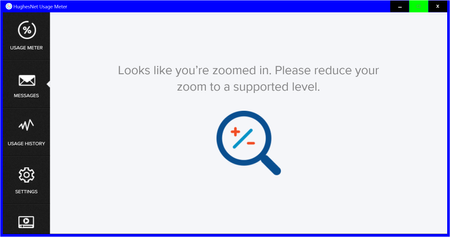
Liz wrote: I just got an update regarding our progress on the magnification issue with the Usage Meter. We're still working on addressing this and we're hoping to have a new Usage Meter version soon to address this (after it's been tested). I'll keep you posted on any other updates on this as I get them. Version 6.1.1 behaves differently, but I'd hardly call it "fixed". Now it displays the following: The message is rather vague in that it isn't clear where one would go to find the zoom controls to which it refers. In any case, the program should handle the situation, not direct you to reconfigure your computer setup to accommodate it. And, please, please, please could you get them to not force a low contrast white color scheme. It is nearly impossible for me to read. I have to use Windows High Contrast Black color schemes to accommodate my visual impairment. I'm sure others with visual impairments would appreciate it if this program factored in the Windows UI color scheme in use or allowed the selection of other color schemes in the program.9.1KViews0likes7Comments