Forum Discussion

Gen5 since late March.....
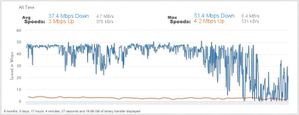

BirdDog wrote:Upload test on hot spot:
How does one make these testmy.net images for single speed tests and show this graphic like above. TJ

When looking at your speed test results table on testmy.net click "Share" next to the result you want, and it will give you that graphic. You can save it to your computer and upload it on here. In Windows I just right click on it and select "Save image as". I imagine you can do something similar with a Mac.
Edit: I should add that if you've just run a test there is a box to the upper right of the result that says "Share This Result". It will give the same image.
Also, you if you click on TID on one of the results and save it, you can add it to another to create a download and upload in the same image.
Click on TID and save it from the popup...
Then click share next to the download test you want to add the upload test to, and add the TID to the second box....
Then click Create Image and it will give you one with both in the same image, and you can save that image and upload it to here.
Related Content
- 11 months ago
- 9 years ago
- 9 years ago
- 5 years ago
- 9 years ago


