Forum Discussion

6.6.0 Usage meter - Data Cycle Info Missing
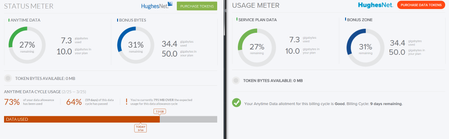

The design is intentional due to new service plans coming soon as well as Gen4 style plans being retired once Gen5 gets into full swing, as in it will display bad only when you have gone over your data allowance for the month. If I am not mistaken it will also display if you enter SmartBrowse in that same area which has essentially replaced the old FAP unless excessive consistent downloading occurs.
They have also changed the method of usage tracking to show remaining usage per each day.
I personally don't see Hughesnet stepping back from the design decision, it's the second or third time they have pushed the new method and design and this version is required for the HT2000W modems that are now in service.

Why would they remove the whole bottom info section due to Gen5, that same info would be benificial to all Gen5 users just the same as it is for Gen4. I understand what you mean about maybe they change the display info/wording but why would they remove the info about customers data cycle usage date, percent of allowance used, how many days passed and the very nice graphing estimate as the month moves along.
Displaying bad only after you run out does not benifit anybody, as you can see in the compare above my data usage is not "Good" as the new version shows, I will be running out before the month is over. The new version makes it look like all's fine when it's really not, while the old version has let me know for a few days now I'm going over and need to slow down. I do understand I can track usage many other ways, but this really looks like a huge step backwards again, I read the old threads on when this dissapeared the first time.
Surely removal of this info bar is a bug and not intended! Gen5 and Gen4 users both would need/want all of that info, there can't be a business or design reason to take this info away from customers because it clears up monthly usage questions from many angles all at once which surely helps alleviate some questions about data usage here and on the phone lines.
SmartBrowse displays all the time with the previous version, just grayed out unless enabled/using
I did see how they updated the graph in "usage history" in the app and the online version, that isn't so concerning (but still odd) as the main page of the staus meter loosing all those features.
Hopefully someone will say how to disable the update check/nag popup if all of this is to be removed permanently.
The new version isn't really helpful if that's how it's supposed to be, I'll stick with this old version that provides relevant info from many angles.
- C0RR0SIVE9 years agoAssociate Professor
It's not a bug... That aside the information is still there, they list remaining percentage per bucket, and amount of days remaining. Having it flat out tell you, "hey you've used too much so far this month" shouldn't be needed, it's upto each user to decide, "Can I really get by these X days with Y% remaining?".
All that aside, it does make sense in terms of Gen5 plans if rumors on DSLR have any truth to them, and trust me, you will want to be upgrading to a Gen5 plan when it becomes available, in most all scenarios.
Maybe if enough people complain about it, they might change it back to the old style, but I have doubts that they will this time.
Would be nice if there was a way to tell it to stop checking for updates though, that is for certain.- cybo549 years agoJunior
Well I'd love to hear from staff why all this information is removed? It was very helpful, and actually made the downloadable staus meter worthwhile using over just looking at the SCC page.
Now, it's just the same as the SCC/192 page, with neither giving all that info easily understood and throughly explained with a quick glance for anyone needing to guage their usage for the month. I know we can "Figure" it all out ourselves, but the app used to do that instantly, and in several easy to digest ways, why would they want to remove this from customers.
They way it is now, that would only really help a daily bucket user, until last week of a month maybe for a monthly user. But for the monthly allotments we have so much previously presented info is now missing that helps customers easily undertsand their usage and limits, when comparing the last version with the new version. No reason to install or open an app to look at the same thing we see in the SCC page
I guess it's like ebay's never-ending "improvements" it's been fixed it for our benifit with all the joy removed :smileytongue: J/K, but really :smileyfrustrated:
Stickin' to the old I suppose :smileyhappy:
And yes, I've seen all the fuss and leaks about Gen5 around many places, we just got on Gen4 so not upgrading here unless it's done automatically (Took me forever to convince everyone to get on Gen4 and they already say it's not any faster than Gen3/HN9000 - not wanna be Gen4) I'd see/like/use the improvements and upgrades, but I'd be the only one that would really be able to tell, aside from everyone else being able to tell by the more expensive plan with and a tiny bit more data per month (Not max/ultra plan users here)
I dug around looking for a way to disable the update check, but haven't found one yet., if I find I'll let you know!
- C0RR0SIVE9 years agoAssociate Professor
The only way to "block" the check is block what ever address it is checking for current version information, if any website, it could be pulling version information from the modem and that would be impossible to block with out messing up how it works.
I am checking to see what URL's it visits.
Related Content
- 3 years ago
- 3 years ago
- 3 years ago


