Forum Discussion

kitnbob
8 years agoTutor
HughesNet Usage Meter 6.7.0.0
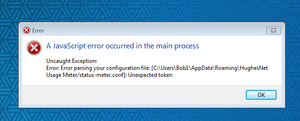
Just in the past week Jan 2018, Usage meter will not run from desktop or at startup, producing this error message any clues?
- 8 years ago
Go to that folder and delete the "status-meter.conf" file then restart the meter.
PS: You may need to enable show hidden files/folders to find it.


MarkJFine
8 years agoProfessor
1. You first have to quit the meter app.
2. It's better that you delete the whole Usrs/xxxx/AppData/Roaming/HughesNet Usage Meter directory. The reason is because chances are there are other files (like the history cache) that are corrupted as well, not just the conf file.
3. Then restart it.

Related Content
- 11 months ago
- 9 years ago
- 3 years ago
- 2 years ago


