Forum Discussion

Pausing Updates in Windows 10 version 1703...
- 9 years ago
I have the Creator Update on a few of my systems (it still wont work on my Laptop, which I am not happy about). On the systems that are running Creator Update, I never noticed an option to Pause either. I also have Home Edition.
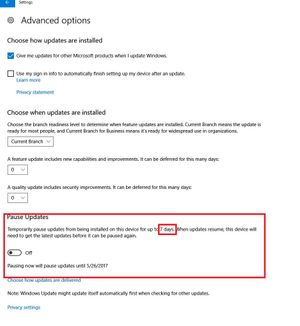
I just did some searching and found that the Pause option is only available in Pro, Education, and Enterprise versions. Link below to other features if you'll want to read em.

"I've never used the ability to set my laptop to a metered connection with WiFi, nor have I done so with the new ability to do the same with my desktop and a direct LAN connection."
I tried and it's an annoying feature, because many of the apps (including the antivirus app, for dog's sake), will pop up messages saying "we can't update this app because you're on a metered connection." Well, gee, then let the malware assault begin. I'll get some rocks.

I randomly check for updates and do the anti-virus updates when they show if no other updates are available. If there are other updates, I open Windows Defender and download the updates from the program its self. This only downloads the update for Defender and no others. I am not sure if you are still able to do the update within the new Defender program in Creator Update (1703).
I also got details from someone where I can set a Scheduled Task to have ONLY Windows Defender update at a certain time each day. Only thing with this is it only allowed me to do update at one specific time each day (I tried other settings but from what I noticed they didnt work) So if there are multiple updates in a day or an update after the set Scheduled Task you wont get the update til the next day. But this way at least Defender is being updated daily instead of not at all.
- GabeU9 years agoDistinguished Professor IV
If Windows Defender is your main AV program for your computer, I would at the very least install the free version Malwarebytes to augment it, if you have not already. Windows Defender is okay, but it's pretty much the bottom of the barrel when it comes to AV, giving you only the most basic of protection. With that said, there are other free AV programs out there that will protect your machine considerably better.
My personal preference is Avast. It has very good ratings, even when compared to many of the paid AV programs. And Malwarebytes is still good to augment that, too.
- BirdDog9 years agoAssistant Professor
Comodo has my vote and US based.


Related Content
- 6 years ago
- 6 years ago
- 9 years ago
- 5 years ago


