Forum Discussion

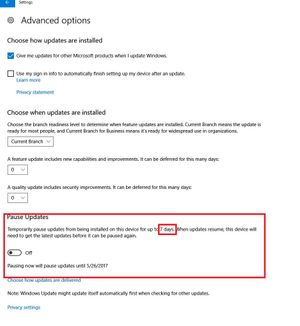
Pausing Updates in Windows 10 version 1703...
- 9 years ago
I have the Creator Update on a few of my systems (it still wont work on my Laptop, which I am not happy about). On the systems that are running Creator Update, I never noticed an option to Pause either. I also have Home Edition.
I just did some searching and found that the Pause option is only available in Pro, Education, and Enterprise versions. Link below to other features if you'll want to read em.

I guess I should have searched a little more thoroughly. :smileyfrustrated:
With that said, and with the initial question asked, I doubt that I will ever use the ability to pause my updates. It was only a question of curiosity as to why one of my computers would show a different ability than the other when they have the exact same version of Windows 10. Well, not the EXACT same. My laptop (a Dell) originally had Windows 8 Pro OEM preloaded and was upgraded to Windows 8.1 Pro, then Windows 10 Pro and then to the present version of Windows 10 Pro. All of them were done with the free upgrades. My desktop (built by me), on the other hand, started with a retail version of Windows 7 Pro, then upgraded with a retail version of Windows 8 Pro, then the free upgrades from that. I wonder if the difference between the allowable days to pause is due to the one being OEM and the other being retail.
In the end, though, like I said, I'll probably never use that ability, anyway. I've never used the ability to set my laptop to a metered connection with WiFi, nor have I done so with the new ability to do the same with my desktop and a direct LAN connection. I've never been close enough in my data use and allotment to need to worry about it.

From what I have read the pauseing feature should be 35 days. It didnt say anything about anything less. It seams like a stupid feature to begin with, WHY would someone pause updates for 35 days!! From what it sounds after the set amount of days it will download the updates. Just sounds stupid. Maybe you should do a post on Microsoft's community to find why your one system is only 7 days. I know I would probably never use the feature either but dont sound right for it to be different. I would imagine it would count down the days if you pause the updates, but I dont believe you had them paused, plus you havent had 1703 installed 28 days.
Related Content
- 6 years ago
- 6 years ago
- 9 years ago
- 5 years ago


