Performance
766 Topics
Terrible Internet!!!
I’ve had this internet for about 3 months now and it is the worst internet I’ve ever had!!! It is a complete scam! 20gb!?! Really!!?! I know you can buy tokens but that is a **bleep**ing joke! Every other Internet I’ve ever had has no restrictions or stupid plans like this! I will be canceling mine as soon as spring comes so I can get something that actually works dug in! I will tell everyone I can what awful internet this is! Screw Hueghsnet!7.4KViews8likes4Comments
Very Slow internet speeds
I've been a Hughesnet customer for about 5 months and my internet speeds at night are horrible. I've complained previously and call tech support many times and the issue never went away. Never had much luck with them. Now however my speeds have drop to below 1 mbps. Hopefully if they don't wear me down I'll continue to post my speeds below until to problem is fixed. Below are 2 downloadsI performed and are tyicial of what I'm seeing. I have a gen 4 system. http://testmy.net/db/t5RnK7L0f http://testmy.net/db/P6qLJeywZSolved15KViews4likes13CommentsWith all the complaints I want to do something Positive...
THANK YOU FOR MY INTERNET !! being stuck at home SUCKS ... I love my internet !!! if I did not do Facebook , twitter youtube and Instagram I would go NUTS !!! yah I used all my Data already but the speed is not to bad. I am just happy to be on it ! HAPPY EASTER !!! oh and I love my guy who comes to my house for a service call ... I forgot his name but you can look it up right ?Solved9.6KViews4likes2Comments
Extremely slow speeds!! No answers.
So, as being a Hughesnet customer for about 6 months or less, I have had numerous calls to tech support. We have spent so many hours on the phone,to the point we are just fed up. We have hardly ever gotten *advertised speeds* and yes I know..not guranteed..whatever. I am just going to be upfront here before everyone chimes in with there usual messages of this and that. Tech support is a joke first and foremost, let's just be real. I have been sent modems, and told to do this and that, disable this, try that. I pay you to provide me a service, you do not pay me to do your job, or pay me to be your tech support. Like clockwork I pay my bill, but for what, honestly. On a good day with plenty of data in my regular plan, I get 5-10mps tops, and that's givinlg you guys the credit because it's hardly ever that..EVER. Now, with my bonus minutes..same or worse. Even right now with about 60% left... I am running on 253-526kbs roughly. I honestly don't wanna hear or about what's promised or not, because I have .lconfirmed tests over 150mbs...so I know it's throttled, and I know they can offer well above 25mbs. We actually have a friend who works for Hughesnet, which I will not convey their identity, who has told me many insightful things, which makes me wish I would have me at signed up for the service. I have testmy results, no problem. I have spent the past few months documenting these issues with dates and times and speeds. I have done all the troubleshooting I care to do. At what point does one take responsibilty for their actions and stop saying...Well, it is weather, or the location where you get your service and blah blah blah. And yes I have had escalated calls returned..A WEEK AFTER THEY WERE SUPPOSED TO CALL BACK. So, don t advertise or have your sales rep tell customers that you will get 25mos almost all the time, and when it runs out roughly 3mbs and that it is enough to still stream because Netflix and Hulu only require 1mbs to stream low quality, and your web activities will still function properly, because that is false...FALSE. I can honestly say, I have held back long enough. What your ads, TV commercials, and cpsales reps should tell you is this, Pay us for internet with speeds of, we dunno..but it Wil work most likely. We cannot tell you how well it'll work, but you can pay us and if it doesn't work..We will just give you these things called Tokens, because we don't really care to add free data, because you pay for it anyways. We can only tell you what our on screen script tells us to say, and we gotta stick to the script. Test results don't lie, advertising does. You get way more data, better service and support from cable. I just wanna know when I have to quit paying for service I am not getting, and when Hughesnet is going to pay me for all the tech support I have done, troubleshooting and hours wasted on the phone? I mean, you guys have it like the IRS. And again, I know the few regulars on here are gonna chime in with...Yeah but, or did you do this..or you're not promised this or that..but I was per my sales call. I want resolutions for my issues, or I want to be done altogether with my service. And I don't need contract referrals either. Mods?!?!?Solved13KViews4likes33CommentsSome info on email spam
I've seen a lot of discussion recently regarding an influx of spam seemingly originating from *.wemystic.com, pnc.si, tenova.com, and now waveapps.com. All of these are from valid domains with valid websites, mostly behind the Cloudflare content delivery network and their emails are mostly backed by GoogleUser email servers. But that doesn't necessarily mean they are real, it just means that the spammers have done a good job of hiding themselves. Many spammers use malicious software to infiltrate an email server. It uses valid email addresses that pass certain validation tests on the email server they've targeted to send their spam, including SPF (Sender Policy Framework) and DKIM (DomainKeys Identified Mail) - these fool the email server into allowing a spammer to appear like a valid email user. On the receiving side it also fools spam detection software into thinking it's valid, making it difficult to trap and filter out. There are other tells involving rDNS (Reverse-Domain Name System) (and others), but I don't want to over-complicate this. Making matters worse, the email servers provided by Google (aka googleuser) to third party users (such as those listed above) have been more or less overrun by Chinese 'spambots' over the past year and Google isn't doing much if anything about it. These are essentially robots that are flooding the internet with an immense amount of spam, consisting of mostly of fake phishing emails designed to get your login credentials to a specific site or attempt to sell you something as a third party partner. How those spambots get installed is another story, since these guys have gotten really good at hiding malicious code and 'plugins' that are used by various websites (as well as phone apps). They've also gotten real good at scanning the entire internet looking for websites with poor security protocols and taking advantage of any security vulnerabilities that aren't patched. They're also getting good at using AI to create spam that appears like normal email to the commonly used spam filtering software, such as SpamAssassin. To say this is a huge problem would actually be an understatement. I received 37 spam emails yesterday on my private, non-HughesNet email server, originating from various sources, mostly from googleuser and Asian domains, as well as normal user ISPs. The key was that a lot of it was similar-looking stuff, indicating that it was all botnet-generated spam from malware-infested websites and people's phone apps. So enough of the mind-numbing background of how it gets there, here's what you can do to protect yourself: 1. Stop using your email address as a UserID: Many of these operate off of bulk lists of email addresses that were either found on the dark web or purchased from a company that you've used that address as your userid. I can tell you that HughesNet did not sell their email list, otherwise I'd be inundated like the rest of you, and I'm not. I have my own website-based email server and rarely use my HughesNet address except for the occasional discussion with HughesNet personnel. So what's happening here is the former. Chances are you have a Facebook account or some other social media account that your userid is your HughesNet email address, and it's been sold to nefarious people by that company. Once it's out there, it's out there and there's nothing more you can do about that. But, you can ensure it doesn't get worse by using something other than your HughesNet email address when signing up for things. 2. Block whole domains, not email addresses: Amanda has already provided a process by which you can block email from a specific domain - not the whole email address, just the part to the right of the '@'. Spammers usually rotate what they use on the left side of the '@' so entering the whole email address will be fruitless. To enter the whole domain is usually done by simply entering something like `@*.wemystic.com` or `@wemystic.com`. The asterisk in the first one can indicate that anything ('sm', 'e', 'email') will fit the pattern for email domains that have two dots. Doing this should filter everything coming from that domain. 3. Don't open unsolicited email: If you get any of these emails - don't open it. Just adjust your filtering if necessary, then delete it, and forget about it. If you happen to open it by mistake, don't click on any embedded links or open any attachments. Nine times out of ten those links will either validate you as a real email address, or worse, much worse, bring you to a site that will install a keylogger on your computer. A keylogger records every userID and password you use and sends it to someone that can hack your credit cards, bank accounts, or other financial institutions. Don't click anything in an email! Segue to... 4. Use 2FA (2-factor authentication) for added protection: As an additional precaution, it is highly recommended that you use some form of 2FA to access these kinds of sites. A good example is using Google Authenticator, which is the software equivalent of an RSA keyfob that generates a six-digit code every minute. If the six-digit code doesn't match, they're not getting in. Last week I got repeated emails telling me someone was trying to hack and change the password to my Instagram account (which I rarely use anymore). I added 2FA to the account and the emails suddenly stopped. Again, segue to... 5. Delete all unused or dormant accounts: As I previously mentioned, unscrupulous companies sell user information for added revenue. Social media companies are notorious for this. If there's something you're not using or don't plan to use, delete the account. The next time they cull their user list for sale you won't be on it. And lastly... 6. Remember to change your passwords regularly and try not to reuse them: Look, I stink at this too. We all do. But once your userid/password pair is on the dark web there will be a ton of misanthropes trying to hack your accounts. You just make it that much easier for them if all of them use the same password. At least don't use the same pair you use for your bank login that you use for Facebook - that would be inviting disaster.364Views3likes0CommentsNothing but problems
Ive had Hughesnet for 12 years now and it has been nothing but problems. If its not super slow internet its not working at all. Ive had probably 10 technicians come out and not be able to fix anything. Finally they moved my dish and it helped for a few months. Then right back to problems. Ive probably spent over 24 hours on the phone with support trying to hear and understand what their saying through their thick accents from India or Mexico. My internet connection has been down for weeks now. A tech came out and it worked for maybe an hour or two and now its down again. He says its working even when I send him a pic of my wifi saying its not. The next day he sends me 3 pics of everyone else's internet saying the same thing. They charge $73 for slow broken internet with barely any data per month and when it breaks constantly they expect you to pay extra to get it fixed. Thats ridiculous!! If you pay for working internet and it doesn’t work, you shouldn't be charged because they can’t hold up their end of the deal. I move out April 1st and I pray I never have to use Hughesnet ever again. They suck all around all the time. I would curse to relay just how much they suck but Im not going to.2.7KViews3likes2Comments
Hughs Net is a sham!
I was promised 100 gb, even with a dish. It is ridiculously slow. So slow that emails are slow to load and send. I was promised I would be able to use Zoom with no problems with the plan I purchased. My work is dependent on virtual, in-person interaction. I cannot use Zoom or any other platform. The signal is practically nill. I am losing students because of the lies I was told. I was promised I could upload/download videos to/from YouTube with no problem, which is also part of my job. I can only do that after midnight!! Most of the time, I can't even watch YouTube videos! I was promised several times, as I asked the sales rep several times to be sure, that I had 4 WEEKS to cancel my subscription with no penalty. IT IS ALL LIES!!! When I called, after 2 weeks of service, I was told that I could cancel my service for $300. I told the lady in accounting, who could not have cared less, what the very conniving sales rep, Michael, told me. She asked if I had been sent anything in writing. No, I had not. I trusted that Hughes Net actually stands behind what their reps say. The lady in accounting said she could not let me out of the contract, because that is not what they do. She said would take $15 off my monthly bill for my troubles. Of course, that has not been done either. Everyone, seriously EVERYONE, I have spoken with about Hughes Net has said the same thing - it's a total joke. They take your money and don't come close to giving you what you were promised and pay for. I am seriously considering taking legal action against Hughs Net.Solved4.6KViews3likes7Comments
Gen 5 speeds extremely slow
I apologize in advance for my lack of knowledge in computer usage but I have been with Hughes Net for over 3 years. I recently changed to the Gen 5 upgrade. Ever since I set up my modum, it takes forever to open web pages. I had a lot morfe success and smoother service before I switched. I even bought a new laptop thinking it was my computer. No change. I have run several speed tests on HughesNet and also on the testmy site. My problem is that there appears to be no way for me to connect a LAN cable to my new laptop nor am I able to purchase a new type of cable just to do these tests. What is interesting is that I did the testmy with my wireless laptop and my speeds were only in the 6.6 Mbps range and when I hooked my old laptop up to the modem with the LAN cable the speed was 12.5 Mbps. The thing is that I use my wireless laptop all the time. I shouldn't have to connect my HughesNet "wireless" modem with a LAN cable to get the speeds I was getting before I upgraded. What suggestions do you have for me? Thank you.Solved32KViews2likes10Comments
Low and unreliable speeds at any time of day/night on newly installed Gen5
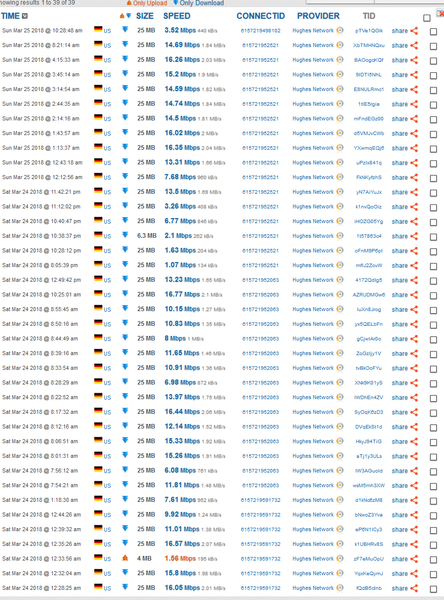
Starting my own post now after reading for days of others' simlar problems which to date appear mostly unresolved. Gen5 installed Friday March 16, 2018, previously using Gen4 I believe it was, through DishNet. Hands down the Gen4 a much faster, more reliable system and the ability to get help far surpassed that of Hughes directly. Hopefully these speed issues will all be corrected before my 30 days is up to cancel. Note, I am not comparing speeds or ping rates, etc to anything other than Hughes Gen4 which is what I had for a few years. Using a brand new HP Windows 10 computer, set up the day after the Gen5 installation. 64bit, 8gb Ram, 1 TB hard drive. Have disabled all updates and only ones that can't be turned off are downloading during wee hours of the morning. As well have uninstalled all extra programs on the computer, installed Chrome and Firefox, but only using Firefox as the Chrome was even worse in performance. Have an adblocker on browser. Installed Glasswire to monito data usage as it appears data may be going far more quickly than with Gen4 but since Hughes is resetting each morning back to zero usage it's hard to tell yet. Computer is hardwired direct to HT2000W modem with a 4 or 5 ft ethernet cord with modem placed, of course, less than that from laptop. All wifi is disconnected on the modem (via the settings in Hughesnet account pages) and has been the entire time. Wifi light on front of modem stays on however, which maybe it's supposed to, but that doesn't make a lot of sense. It occasionally flashes, however. (?) I have no wireless devices that connect or try to connect to a wifi connection, and no close neighbors. I ran a speed test on March 19 via testmy.net but wasn't logged in. Starting March 24 I logged in and started running tests using 25mb down and 4 mb up but don't do many upload tests as that's not my main concern although those speeds are less than half what they should be. I'm posting a URL which I believe will take you to the test results, but in case it's not correct I am also posting a screenshot of the tests. Note the incredible variance in speeds, but in general, even at what the tests show might be passabile speeds, actual usage to watch a 2 min low quality video on youtube, (or anywhere else), is nearly impossible due to buffering. Yes, video saver is on now but it makes no difference usually. Also note that the "higher" speeds in the test were not totally, but mostly, late night. Still, these are generally nowhere near the advertised speeds, but close sometimes to 60%. URL: https://testmy.net/copytext?qX=http://testmy.net/stats/?-_-amp;t=u-_-amp;d=03252018-_-amp;x=8-_-amp;l=50-_-amp;q=JEANNE%20H Screenshots (included the beam, etc.): I also rebooted the modem this morning, just prior the the latest speed test noted above that tested 3.52Mbps download speed. I have, as well, had pretty much clear skies and good weather, no rain, for the entire 9 days that I have had this new system. I understand that satellite signals are complex and at best not real consistent, yet the Gen5 system, thus far, has been far worse is really every respect than the previous Gen4. Add to this the fact that the Gen5 was promoted, at least to me, by several different people, (DishNet, three reps/techs connected to the installer I had), all promotional materials from all forms of media from HughesNet themselves, etc, as being much faster than Gen4, including the fact that the throttled over data limit speeds would still be 2 to 3 times as fast as the usual non-throttled speeds of Gen4, the fact that it has streaming capabilities, and the fact that you could actually use a phone with the system (thank goodness I didn't go ahead and get that). None of these are true. And by judging from just the complaints I see on here and as well other review sites this is very common and to date pretty much unresolved. I appreciate that there are people on this community trying to help, I sincerely do. It appears that, for whatever reason(s), this Gen5 system is either not capable of what was promised, been over subscribed to the point of not being viable, launched prematurely, or has serious issues that are either being not recognized, not admitted to, or simply not able to be corrected. If someone here can "fix" these issues, in a reliable, long standing way, then all is well and good. It appears that may not be possible. At any rate, if I cannot get this system to perform at least on par with the older system before my 30 days is up, I will have to cancel and look elsewhere or see if it's possible to go back to Gen4. If I have overlooked any test needed or other info, please alert me and I will oblige to the best of my ability. Thanks anyone and everyone that can help or responds.Solved25KViews2likes59Comments