Forum Discussion

HughesNet Usage Meter 6.7.0.0
- 8 years ago
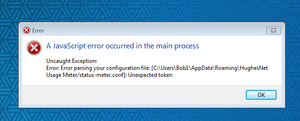
Go to that folder and delete the "status-meter.conf" file then restart the meter.
PS: You may need to enable show hidden files/folders to find it.


All you have to do is close the program in the taskbar, then delete the HughesNet Usage Meter folder in C:\Users\[your User name]\AppData\Roaming\, then restart the application. It will recreate the HughesNet Usage Meter folder inside Roaming. Remember to enable hidden items to be viewed so you can find AppDAta and successive folders.
There's no need to uninstall and reinstall, nor download a new installation file.

Deleted the config file finally, took awhile to find it. Then went to program downloaded file and clicked on the main download file and finally the icon started to work without redownloading the whole program. Thanks. one final question why did the "old" version work just fine with the power crashing the computer and would come back up with the Status Meter intact and working?? New one crashes at the slightes hicup and hear we go again??
Related Content
- 11 months ago
- 9 years ago
- 3 years ago
- 2 years ago


