Forum Discussion

Low and unreliable speeds at any time of day/night on newly installed Gen5
- 8 years ago
Hi deserthaven,
Thank you for your patience and cooperation. I ran diagnostics on your site and nothing out of the ordinary is showing up. Your download speed right now from your modem to the gateway is 20904.626 kb/sec. How are you finding your internet experience lately? Is there something in particular you're trying to do online that's proving difficult?

No worries, but thanks for letting me know! Interesting thought, I can't confirm that, however.

Liz,
One more update. Was having trouble doing anything on pc so ran more tests. Still somewhat overcast here but no rain or other precip, wind, etc.
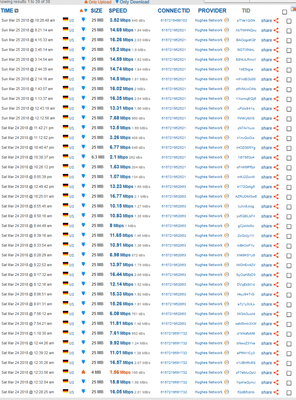
Worse than ever for some reason. The test took a very long time to complete,. Got 181kbps and 292kbps downloads and strangely, a 1.3Mbps upload which is about average for this system so far. Yes, correct, kbps. Hopefully this changes when weather clears completely but even at that I have never had this problem or speeds with the worst weather on the Gen4 system. Not sure why that would be.
- GabeU8 years agoDistinguished Professor IV
It's possible that your speeds will improve. Being that it's a new modem, it may very well have to update its software to become current. There was a sizable update very recently and it may presently be in the process of downloading and/or installing that update. Hopefully your speeds will improve soon.
- deserthaven8 years agoJunior
GabeUwrote:It's possible that your speeds will improve. Being that it's a new modem, it may very well have to update its software to become current. There was a sizable update very recently and it may presently be in the process of downloading and/or installing that update. Hopefully your speeds will improve soon.
Gabe,
Thanks for the info. When he swapped it out it took many minutes so I'm assuming it did all of the updating then, but it's possible there's more to come. Oh, just remembered, too. The tech ran a speedtest, I believe on Ookla, before he left and got around 11Mbps download. I'll watch it periodically over the next 24 hours and maybe the weather will clear as well. I haven't tried the wifi on this one yet but maybe I should? I don't want to mess any stats up though if indeed that would. I'm still running the glasswire for data usage and by far the speedtests are the biggest user of data.
- GabeU8 years agoDistinguished Professor IV
You can certainly try the WiFi, but the only thing that might become a bit of a pain is disabling it every time you run a speed test, as when speed tests are run they should be done with the WiFi disabled. This makes sure that nothing is sapping any bandwidth through WiFi during the speed tests.
And the speed tests definitely use up a lot of data, that's for sure. Those Ookla (speedtest.net) tests can be even worse, depending on the speed. I've seen that site chew through 70-80MB per test. It's crazy. That's one of the reasons, among others, that Ookla's not recommended for diagnostic speed testing like this. But, really, I wouldn't run more than a couple more tests before the night's out, and that should be plenty for tonight. Maybe one or two download tests and one upload test around the same time. Then, maybe try a couple more tomorrow to see if the speed has picked back up at all, which I'm hoping is the case.
Oh, and to answer a question you asked a couple of posts back, yes, that link will always show all of the tests, including the most recent ones you've run. That's one of the reasons that it's requested to create an account and run the tests under that account in the speed test instructions. It keeps all of the tests in one place, making it much easier for the reps and engineers to look at them. Without running the tests under a user created account people would have to post a link to, or picture of, each test. Eek! What a pain that would be! :p

Related Content
- 8 years ago
- 9 years ago


