Forum Discussion

Dashboard Indicating DNS Acceleration[N] Problem
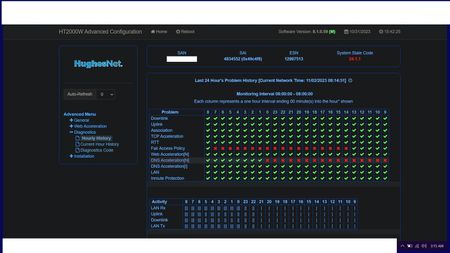

I didn't need to wait a couple days. The problem is still ongoing.
At 2:00 AM it started right back up again despite the new modem.
11-13-2023 Current Hour (229AM).jpg11-13-2023 Hourly (230AM).jpg11-13-2023 Diagnostic Codes (230AM).jpg11-13-2023 Usage Status (233AM).jpg
I tried to run a speed test but after being stuck in a loading loop for more than 10 minutes I stopped trying to get the results.
11-13-2023 Speed Test (244AM).jpg
I don't know what the problem is. Maybe it's something to do with the dish itself. I only know that I'm the only one on the computer at this hour, the weather is not bad, I still have data in my "Bonus Zone" but I can barely get pages to load right without getting stuck in a loading loop or needing to be refreshed and watching videos even on the lowest quality settings is basically impossible. We've been HughesNet customers for several years now and are very familiar with the drop in speed associated with the Fair Usage Policy, the reception problems that can be experienced with bad weather but this isn't what the service is normally like under the same conditions and it's not something I can fix on my own.
Trying to run the speed test again gives me this:
11-13-2023 Speed Test (257AM).jpg
Just to show a refreshed look at the current and hourly diagnostics at 3:00 AM:
11-13-2023 Current Hour (300AM).jpg11-13-2023 Hourly (304AM).jpg
I would just like it fixed so I can get back to enjoying the service I'm used to.
Related Content
- 4 months ago
- 6 years ago
- 4 years ago


