Forum Discussion

Puzzle: no internet with state code 0.0.0.
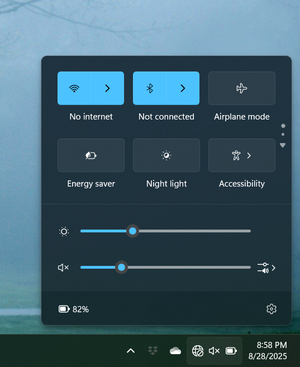

Update: At 7:58 pm the internet dropped, but the modem continues to show no errors at all. I'm using the very slow Verizon hotspot to post this update.
In case it helps at all, I tried connecting directly to the modem with an Ethernet cable, but it didn't make any difference.
Hopefully you can find some way of fixing this quickly...I need the internet for work.
Thanks for all your help!

maratsade,
That is very strange. I'm going to try anything I can right now remotely and hopefully it makes a difference but it is a bit difficult to do when there are no errors being reported by the modem. I apologize for this scenario and prefer when there is a clear reason as it can be fixed the quickest. These issues are the worst as they take investigation beyond the normal and time which is inconvenient. With that being said, if what I try on my end does not work, the best I can do is escalate this internally but we do have the weekend and holiday coming up. While I'm confident there will be a fast response once we are back in office, that may be too long for you. I am apologizing in advance for the inconvenience if it gets to that point. -Damian
- maratsade4 months agoDistinguished Professor IV
Thank you, Damian. This is really very strange. The internet came back at midnight, following the same pattern as for the last few days .
I totally understand the difficulty in figuring out what may be going on when there are no errors that can give a clue. I’m at a loss myself. The modem reports no errors, and the devices recognize there’s a network but report no internet connection. Then at midnight everything comes back.
And of course there’s a long holiday weekend to complicate things! Murphy’s Law.
I appreciate you looking into this, and I hope someone will figure out what‘s going on. Enjoy the long weekend!
 rdickerson4 months agoNew Poster
We are having the exact same problem. Started several days ago. The only difference between our problem and the one described here is that we have a rooftop dish rather than a ground dish.
- maratsade4 months agoDistinguished Professor IV
Oh no, that really stinks. I hope the issue happens to you when you don't need the connection.
Because the reps on this site like to work with each user individually, I suggest you create a new thread under https://community.hughesnet.com/category/HNSupport/discussions/TechSupport
Give as much detail as possible so a rep can have enough info to start working with you.
Good luck! I'm sure all this is temporary, but even so, I'd love to know what the cause is.
- Damian4 months agoModerator
Absolutely and I am happy to help. I just wanted to update you and let you know this issue has been successfully escalated and is currently being investigated. As soon as information is made available to me I will update you ASAP. I truly hope it resolves on its on even before the issue is determined but if not, I apologize for the inconvenience. -Damian
- Damian4 months agoModerator
To give another update, they are making some progress in the investigation but we need just a bit more info as well as your help testing something if that's ok.
1. Do you have the modem plugged into a power strip/surge protector?
2. If it is please try plugging it into a wall outlet directly for tonight and if it is already plugged directly into a wall outlet, please try plugging into a surge protector or power strip tonight instead.
- maratsade4 months agoDistinguished Professor IV
Hi Damian, I was out yesterday and didn't get this. I will plug the modem into an alternate source tonight, 9/4/2025, after 9 pm.
Related Content
- 30 days ago
- 2 years ago
- 6 years ago
- 5 years ago
- 6 years ago


