Forum Discussion

Outlook for Mac login failure
- 9 years ago
Good morning Mark,
Can't do anything about latency, but just taking a stab in the dark here, you can try disabling Web Acceleration (WAS) before you log in and keeping it off for the duration of checking your e-mail. I'm curious as to whether that will have any effect. Here's how to toggle WAS off and on. Having WAS off is only for temporary use and not for long term use, so please remember to turn it back on when you're done.
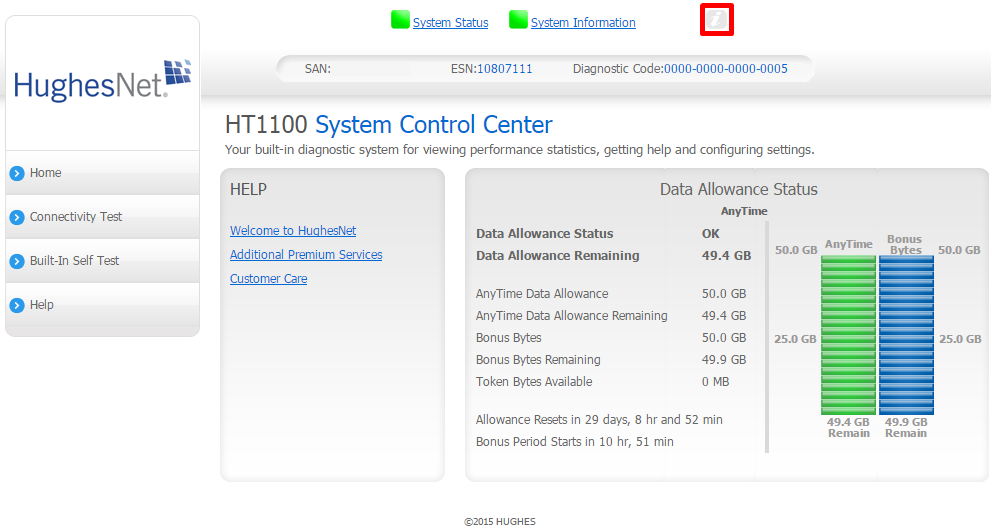
Visit your System Control Center (SCC) at 192.168.0.1 and click on the "i" icon at the top.
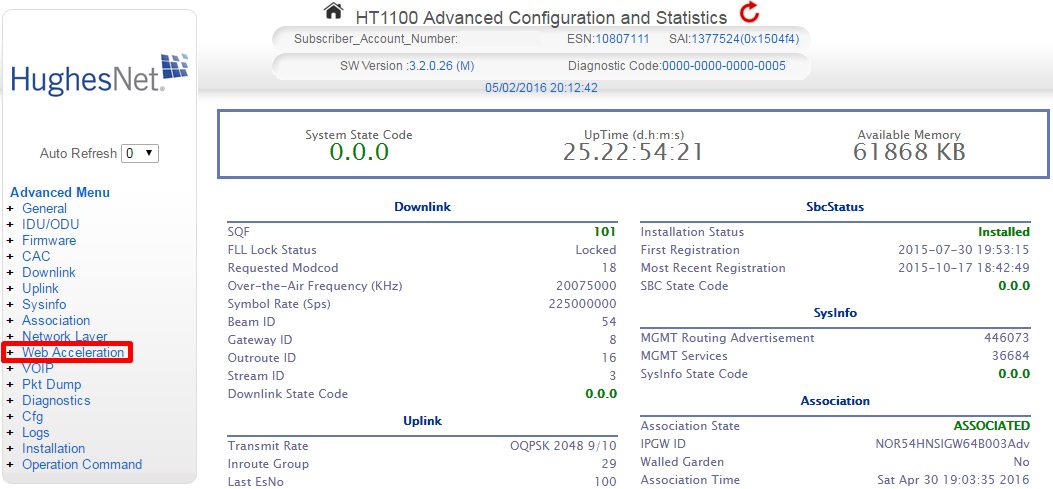
Click on Web Acceleration in the left hand menu.
Click on Control in the expanded sub-menu.

Uncheck the box next to Web Acceleration Enabled.

-Liz


Thank you, Liz. Fingers crossed, but that seems to have done the trick. I've gone more than one hour without a login failure. If it keeps happening, I'll post an update here. But it appears to be making a difference.
Because my satellite internet connection isn't all that fast to begin with -- so I already have to settle for less than optimal load times, and rarely bother trying to stream video -- what is the downside to keeping web accelleration control off permanently?
And ... literally the minute I posted my reply, I got a login failed message. So, NOT solved.
Related Content
- 4 years ago
- 6 years ago
- 6 years ago
- 6 years ago
- 9 years ago


