Forum Discussion

Promotion has expired; now being throttled?
- 8 years ago
"Has anybody else experienced this after their "promotional offer" has expired? Any idea what this "promotional offer" is / was?..."
I had a promotional offer, and when it ended, nothing changed except the monthly fee went up.
There is likely something else going on with your system that coincided with the expiration of your promotional offer.


Your issue(s) is unrelated to the OP's. If you would like help with your issue(s), please start a new topic, which you can do here...
https://community.hughesnet.com/t5/forums/postpage/board-id/TechSupport

Just to amplify GabeU's point, it's more likely that one of two things happened:
1. You modem rebooted into a different GWID/outroute configuration that is more congested than what you were in. You can try doing a hard reboot by unplugging the modem from the wall, waiting a few minutes, then plugging it back in to re-associate to a better configuration.
2. There's a problem with the upstream provider's routing tables that's affecting speed to specific locations, such as Microsoft (I mention this because Level3 has been having sporadic issues going to MS for the past couple of months).
- GabeU8 years agoDistinguished Professor IV
Somewhat off topic, but also related...
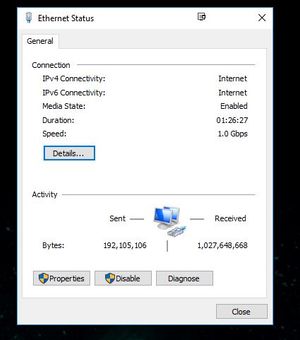
Do you know when, or how often, the Activity section of the adapter's stats resets? The reason I ask is that I just turned my computer on about twenty minutes ago, after having been off for a while, and it shows the following....
Now, of course, there's no way I downloaded 7.6GB or uploaded nearly a half gig of data in twenty minutes. It just gets me wondering when it resets. When I originally replied earlier it showed 7.5... something or other for the download, so it's not resetting when I shut the computer down (no sleep or hibernation, but complete shutdown). The time is resetting, but not the data.
- MarkJFine8 years agoProfessor
Tbh, I was under the impression it reset when something related to the adapter changed such as the IP address, and that it kept a running total even after a power reboot. But I could be very wrong. Does seem odd that you'd have 7GB after 20'.
Can try experimenting with rebooting/changing adaptors and opening that window right afterwards to see what changes. I know Macs reset their totals on a reboot as well as when you switch from wifi to ethernet.
Edit: Keep in mind that's a number that the adaptor thinks it transferred between the machine and the modem, as well as any other loopbacks. Doesn't necessarily mean it's what went out past the modem.
- loveoldtrux8 years agoSophomore
Markjfine,
Yeah, with Windows 7 (or was it XP?....) I noticed the adapter reset after every reboot - with Windows 10 it just keeps a running log and does not reset when system rebooted. No problem - I just reset it manually when turning the system on every day. SOMETIMES after a reboot, the adapter will reset to 0 KB. Still no problem - I just keep it open every day to see what's going on...
Thanks,
Mark
- loveoldtrux8 years agoSophomore
GabeU,
Thanks for the reply; I manually reset ethernet adapter stats each day when I log in at 4:30 am to closely monitor what is going on and I also run glasswire daily. As the extended data allowance ends at 8 am, I also then reset the adapter stats to monitor my usage as less data is allowed to download from then till 2 am without buying the tokens.
Anyway, good thing I posted this as somebody at Hnet must have read it and created a troubleticket and resolved the issue; would have been nice for them to send me the ticket number so when this happens again, I can get it resolved easier :mansad:. Somebody must have jiggled a cable or reset a switch or something. As my adapter stats are reset each morning, I have included a picture this morning of how it usually reads when working properly - you can see I am working much MUCH better now!! Working SO good in fact, I better WATCH that data throughput :manhappy: .
Ha ha ...yes, I learned years ago to reset the adapter stats daily as it will gradually get bigger and bigger and bigger if not reset. Then one day you'll look at it after turning the system on and it'll read 50 + gb or whatever.... and you'll be sitting there scratching your head and muttering to yourself :manlol: I do run the glasswire - nice to see when NOTHING is going on if it's a site related issue or system issue. If my slots site is not working, I'll jump to CNN.COM to see if glasswire reports activity there - if not, it's a system problem - if activity at CNN.COM, then it's a site problem. I've doing the slots since last summer - several hours a day, so I know when something is amiss.
Again, thanks for your reply, GabeU
- GabeU8 years agoDistinguished Professor IV
loveoldtrux wrote:Anyway, good thing I posted this as somebody at Hnet must have read it and created a troubleticket and resolved the issue; would have been nice for them to send me the ticket number so when this happens again, I can get it resolved easier :mansad:. Somebody must have jiggled a cable or reset a switch or something.
It's highly unlikely that anyone did anything to resolve your issue because the pictures you're posting don't show that one existed. There is no context to them. All they show is that that particular amount of data was downloaded/uploaded during that time, but again, there's no context to them. This is also another reason why I don't believe that there was any intervention. Any attempt to help would have been preceded by a number of questions/requests to establish that there was a problem, with the likely first request being speed test results, followed by what it is that you were trying to download, and from where.
If we're to look at the pictures and deduce what I think you're trying to show it only shows that, if you were trying to download a single file during the entire time, your speed went from approximately 1.7Mbps to 2.5Mbps, but again, because there's no context, even that can't be deduced.
Please understand, I'm not trying to sound like a jerk or condescending or anything of the sort. I'm just trying to understand what it is you believe the pictures show. Are you starting to download a large, multigig file, then allowing it to continue downloading for an hour to see how much was downloaded in that hour? If so, what is the file (from what site)? Or, are you choosing a 1GB file from somewhere and seeing how long it takes to download the full 1GB? If so, again, what is the file (from what site)? I ask because I would like to try the same to see what happens for me.

Related Content
- 7 years ago
- 4 years ago
- 5 years ago


