Forum Discussion

Promotion has expired; now being throttled?
- 8 years ago
"Has anybody else experienced this after their "promotional offer" has expired? Any idea what this "promotional offer" is / was?..."
I had a promotional offer, and when it ended, nothing changed except the monthly fee went up.
There is likely something else going on with your system that coincided with the expiration of your promotional offer.


Somewhat off topic, but also related...
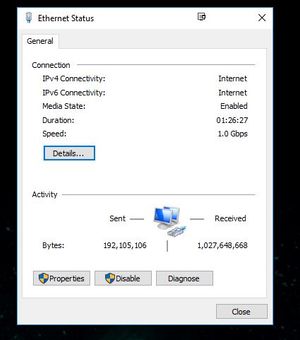
Do you know when, or how often, the Activity section of the adapter's stats resets? The reason I ask is that I just turned my computer on about twenty minutes ago, after having been off for a while, and it shows the following....
Now, of course, there's no way I downloaded 7.6GB or uploaded nearly a half gig of data in twenty minutes. It just gets me wondering when it resets. When I originally replied earlier it showed 7.5... something or other for the download, so it's not resetting when I shut the computer down (no sleep or hibernation, but complete shutdown). The time is resetting, but not the data.

GabeU,
Thanks for the reply; I manually reset ethernet adapter stats each day when I log in at 4:30 am to closely monitor what is going on and I also run glasswire daily. As the extended data allowance ends at 8 am, I also then reset the adapter stats to monitor my usage as less data is allowed to download from then till 2 am without buying the tokens.
Anyway, good thing I posted this as somebody at Hnet must have read it and created a troubleticket and resolved the issue; would have been nice for them to send me the ticket number so when this happens again, I can get it resolved easier :mansad:. Somebody must have jiggled a cable or reset a switch or something. As my adapter stats are reset each morning, I have included a picture this morning of how it usually reads when working properly - you can see I am working much MUCH better now!! Working SO good in fact, I better WATCH that data throughput :manhappy: .
Ha ha ...yes, I learned years ago to reset the adapter stats daily as it will gradually get bigger and bigger and bigger if not reset. Then one day you'll look at it after turning the system on and it'll read 50 + gb or whatever.... and you'll be sitting there scratching your head and muttering to yourself :manlol: I do run the glasswire - nice to see when NOTHING is going on if it's a site related issue or system issue. If my slots site is not working, I'll jump to CNN.COM to see if glasswire reports activity there - if not, it's a system problem - if activity at CNN.COM, then it's a site problem. I've doing the slots since last summer - several hours a day, so I know when something is amiss.
Again, thanks for your reply, GabeU
- GabeU8 years agoDistinguished Professor IV
loveoldtrux wrote:Anyway, good thing I posted this as somebody at Hnet must have read it and created a troubleticket and resolved the issue; would have been nice for them to send me the ticket number so when this happens again, I can get it resolved easier :mansad:. Somebody must have jiggled a cable or reset a switch or something.
It's highly unlikely that anyone did anything to resolve your issue because the pictures you're posting don't show that one existed. There is no context to them. All they show is that that particular amount of data was downloaded/uploaded during that time, but again, there's no context to them. This is also another reason why I don't believe that there was any intervention. Any attempt to help would have been preceded by a number of questions/requests to establish that there was a problem, with the likely first request being speed test results, followed by what it is that you were trying to download, and from where.
If we're to look at the pictures and deduce what I think you're trying to show it only shows that, if you were trying to download a single file during the entire time, your speed went from approximately 1.7Mbps to 2.5Mbps, but again, because there's no context, even that can't be deduced.
Please understand, I'm not trying to sound like a jerk or condescending or anything of the sort. I'm just trying to understand what it is you believe the pictures show. Are you starting to download a large, multigig file, then allowing it to continue downloading for an hour to see how much was downloaded in that hour? If so, what is the file (from what site)? Or, are you choosing a 1GB file from somewhere and seeing how long it takes to download the full 1GB? If so, again, what is the file (from what site)? I ask because I would like to try the same to see what happens for me.
- loveoldtrux8 years agoSophomore
Ooops - spoke to soon. As you can see from the image below I've been online for 45 - 50 minutes and only 145 MB of data has downloaded - when system is working properly this will read around 750MB +. Hughes net is now prompting me to mark one of the previous answers as a solution. None have provided a solution so I'm not marking any as a solution. I guess I'm just going to have to live with this for $80+ a month..... :manmad:
- maratsade8 years agoDistinguished Professor IV
Loveoldtrux, you may want to read what GabeU wrote to you and provide some context for what you think are issues. You are wasting your time when you continue to ignore people who are trying to help you, and you are wasting theirs.
Edit: I am not a Hughesnet employee or representative.
- loveoldtrux8 years agoSophomore
Maratsade,
You're a real piece of work, aint'cha maratsade? "wasting their time and mne". Right. You are typical for "tech support" - make the customer feel like an a _ _ so they will discontinue contacting you and YOU end up with goof looking stats, giving you time to sit on YOUR duff to browse the web. Right - real good.
For your information I DID look at GabeU's replies - it's quite obvious he doesn't know what I'm talking about when the information is right in front of his eyes.
Good day all, I'm closing this ticket - I don't need to be beaten up by a company for 88.00 a month
- GabeU8 years agoDistinguished Professor IV
Again, there's no context to those pictures. They aren't helpful in any way. All this latest pic shows is that in 52:12 a total of 145MB was downloaded and 23MB was uploaded, nothing more. Not when, what, how, size(s), duration, etc. There is absolutely no context.
The pics you're posting don't show what you think they show.
Related Content
- 7 years ago
- 4 years ago
- 5 years ago


